> ## Documentation Index
> Fetch the complete documentation index at: https://docs.spine.altician.com/llms.txt
> Use this file to discover all available pages before exploring further.
# Camera Controls
> Adjust the endoscope camera position and orientation
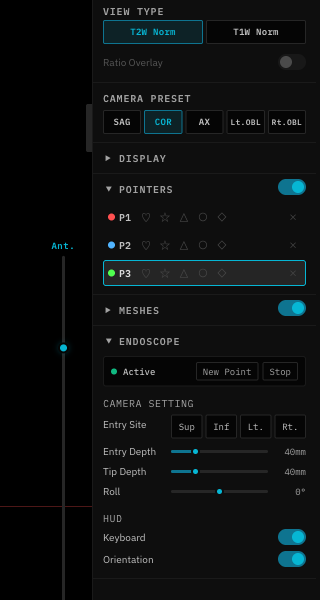
The right panel shows endoscope-specific controls when in endoscope mode.
 ## Depth
The **Depth** slider controls how far the camera is inserted from the entry point (in mm). Increase depth to look deeper into the anatomy.
## Entry Distance
The **Entry Distance** slider adjusts the camera's distance from the mesh surface at the entry point (in mm). Useful for pulling back from the surface for a wider view.
## Roll
The **Roll** slider rotates the camera around its forward axis (-180° to +180°). Use this to align the view with anatomical orientation.
## Entry Nudge
Fine-tune the entry point position without leaving endoscope mode:
| Control | Direction |
| ----------- | ------------------------------- |
| **Sup/Inf** | Superior (up) / Inferior (down) |
| **Lt/Rt** | Left / Right |
The Entry Depth slider is only visible during repicking mode. During initial picking, it is hidden.
## Depth
The **Depth** slider controls how far the camera is inserted from the entry point (in mm). Increase depth to look deeper into the anatomy.
## Entry Distance
The **Entry Distance** slider adjusts the camera's distance from the mesh surface at the entry point (in mm). Useful for pulling back from the surface for a wider view.
## Roll
The **Roll** slider rotates the camera around its forward axis (-180° to +180°). Use this to align the view with anatomical orientation.
## Entry Nudge
Fine-tune the entry point position without leaving endoscope mode:
| Control | Direction |
| ----------- | ------------------------------- |
| **Sup/Inf** | Superior (up) / Inferior (down) |
| **Lt/Rt** | Left / Right |
The Entry Depth slider is only visible during repicking mode. During initial picking, it is hidden.